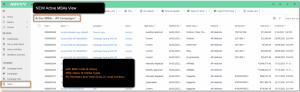
Steps to access the MBAs section of Advvy
- Login to Advvy
- Use the left navigation bar to select MBAs
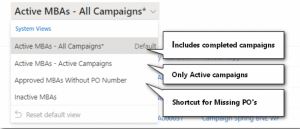
The views are a collection of MBA’s from all campaign records in Advvy. Variations of the MBAs views include:
- A view of all MBAs and their status across all Campaigns (including campaigns that have been completed)
- A view of all MBAs and their status across all current Campaigns that are Active (in progress)
- A view of all MBA’s that do not include a Purchase Order number
- A View of Inactive MBA’s
The view shows the MBA code, MBA name and status along with Purchase Order numbers and Total Gross value.
Note: a Campaign may have more than one MBA attached to it – each time the Create NEW MBA is used a new MBA is created with a new MBA number that can be tracked in this view.