It’s important to understand that ADVVY uses two conditions to add users to a campaign – client team membership and role. Client team membership controls which campaigns a user can access in Advvy. Media workflow role determines if a user should be added to a campaign.
If the campaign’s workflow doesn’t include at least one role that belongs to the user, they won’t be added to the campaign. The logic behind this is that if a user doesn’t have a role appropriate to a campaign’s workflow, they shouldn’t be added to the campaign.
This means that for a user to be added to a campaign (and the ability to assign that user to tasks), that user must be part of the client team that is assigned to the campaign and the user must have a role that is included in the campaign’s workflow.
If the user is on the client team, but does not have at least one role that’s included in the campaign’s workflow, then that user will not be added to the campaign. To check the users that have been added to the campaign, follow the steps below:
- Navigate to a Campaign
- Go to the Workflow Activities tab.
- Click on the Workflow Team icon (people icon) that is on the top right of the navigation bar
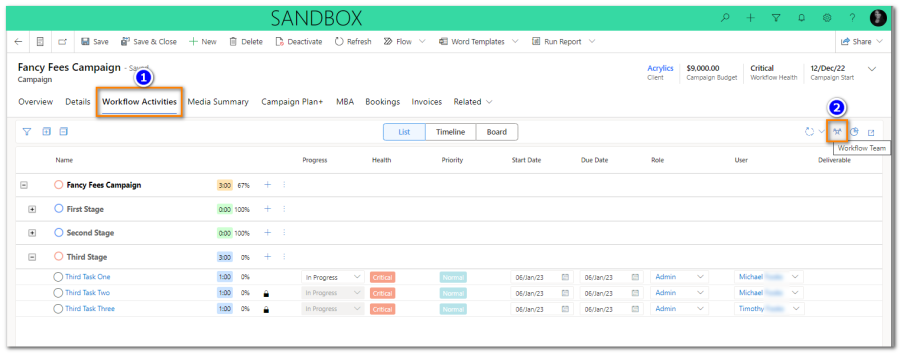
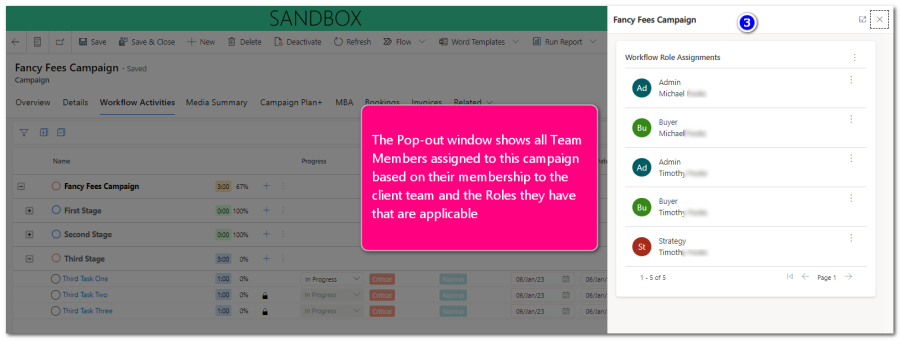
The user can view the list of names after clicking on the icon. Be sure use the page buttons to view additional names if needed.
Note: If a user in the team has more than one role, for example if ‘Michael’ has been assigned two roles in his User Profile ‘Admin’ and ‘Buyer’, then Michael will be added to the Campaign with BOTH roles (if both roles are in the workflow template).
Campaign Managers may need to edit the Workflow Team for any workflow role assignments where there are multiple users with the same role. Members can be added or removed from this panel.
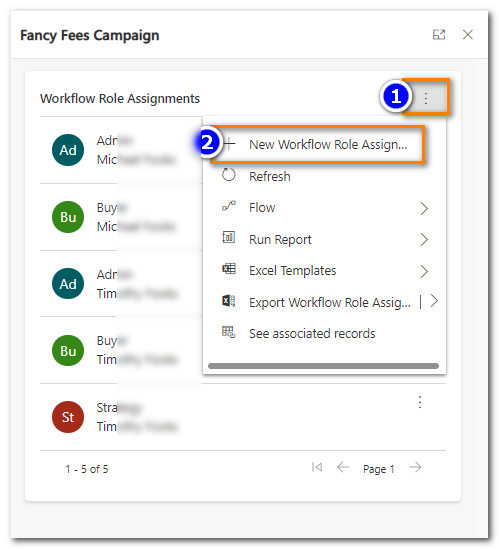
Add a user to a Role Assignment
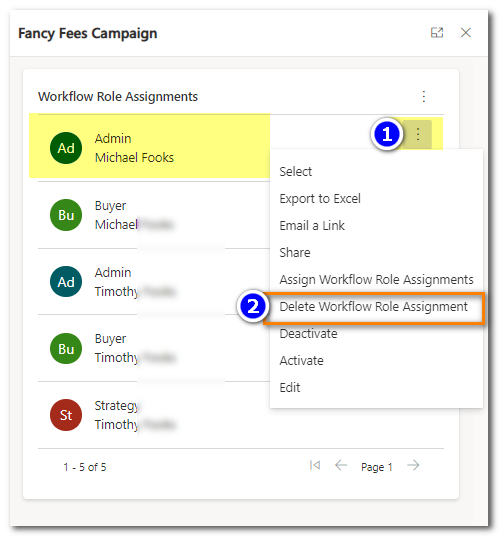
Remove a User Role Assignment
It is highly recommended that when creating a new workflow the user creates a test campaign to verify the correct users are available for task assignment. If there are users missing please refer to our help guide on How to add users to an existing campaign.
Performing this test will ensure that all users that should be included in a campaign are added to that campaign.