Advvy Excel Addin for Media Plans
Advvy has the capability to upload existing Excel Media Plans into your campaigns and then provide views across all campaigns. The purpose of syncing media plan data is to enable reporting across all client accounts and give visibility on the media investment across all accounts. By syncing this data, it will save you time and effort as Advvy will automatically produce key reporting from that data.
Media Plan Template Management is a way for teams to use consistent naming conventions when planning. This will produce rich reporting when combined with synced campaign data across all of your client campaigns.
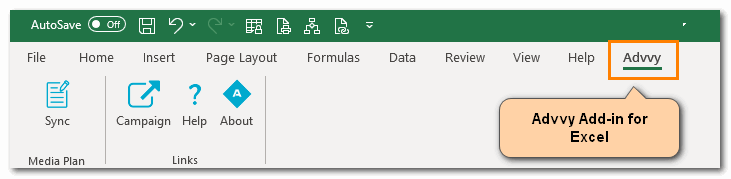
MANAGED Add-in Steps
Global Organisations may load the Advvy Add-in automatically into Microsoft Excel as a Managed app. To check this…..
-
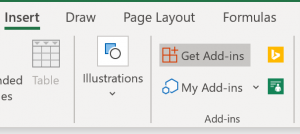
- In Microsoft Excel, click on the [INSERT] menu and then click [GET ADD-INS]
- Click on [ADMIN MANAGED] to display the available Add-ins, including the Advvy Media Plan Add-In
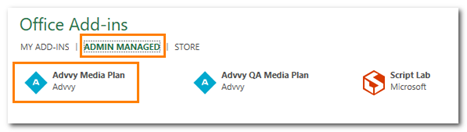
N.B if the Advvy Add-in is not displayed, try the Microsoft Office store steps below. - Click on [Advvy Media Plan] and then click [ADD] at the bottom right.
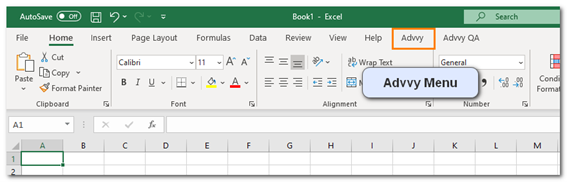
- The Advvy Menu is now added to Excel and can be used with configured Excel Media Plans.
- In Microsoft Excel, click on the [INSERT] menu and then click [GET ADD-INS]
OFFICE STORE Add-in Steps
For most users you can access the latest version of the Advvy Add-in in the Microsoft Store.
-
- In Microsoft Excel, click on the [INSERT] menu and then click [GET ADD-INS]
- Click on [STORE] to display the available Add-ins, and search for Advvy Media Plan Sync
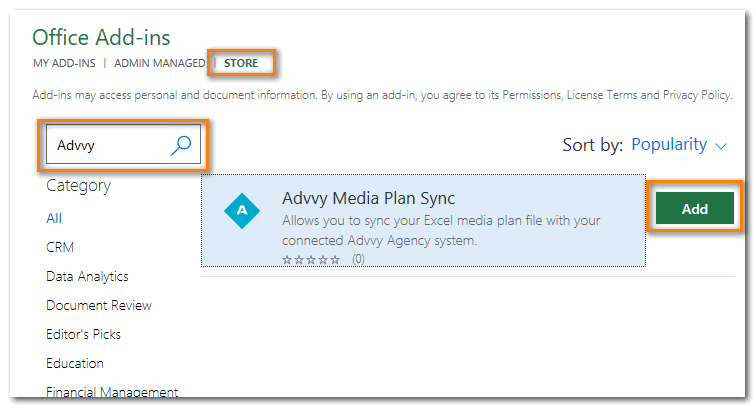
- Click [ADD] and accept the Terms & Conditions to Continue.
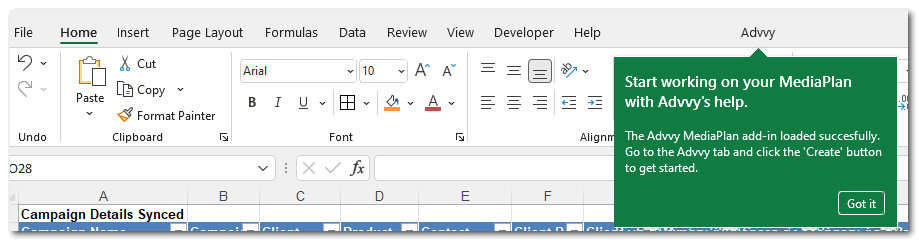
- The Advvy Menu is now added to Excel and can be used with configured Excel Media Plans.
- In Microsoft Excel, click on the [INSERT] menu and then click [GET ADD-INS]
Refer to the following for more about Advvy and Media Planning Sync
Previous article: 6 Client Team Management Next article: 1 Admin Fundamentals