Highlighted Features in This Release
All about Workflow!
- NEW Auto Scheduling in Campaign/Project: Workflow Activities
- NEW Cascading Dependencies in Campaign/Project: Workflow Activities
- NEW Effort and Completion columns in Campaign/Project: Workflow Activities
- UPDATED Health calculations for Stages
NEW Auto Scheduling in Campaign/Project: Workflow Activities
This new feature provides a fast way to schedule workflow tasks for campaign and project managers. The purpose of auto-scheduling is to create a cascading relationship between the tasks in a campaign. This means Task 2 starts after Task 1 ends, Task 3 starts after task 2 ends etc.
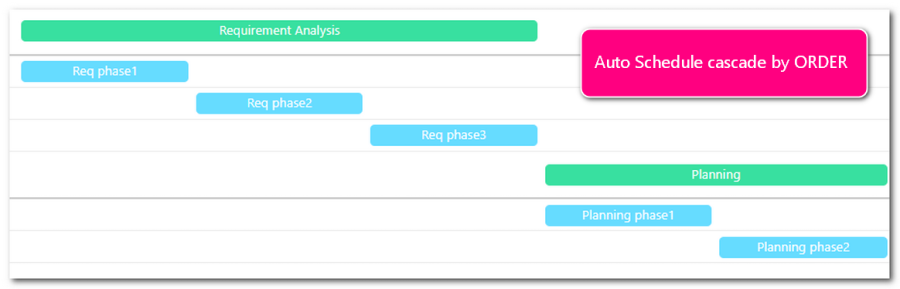
Auto scheduling will save time when creating workflow relationships and provide a fast way to pace your workflows.
Advvy Auto Scheduling Features:
- Forwards and Backwards direction
- Auto Schedule by Order of tasks – ignores any dependencies (blocked blocker)
- Auto Schedule by Dependencies – considers only the blocked and blocker tasks -other tasks set to WF start
- Auto Schedule by Order and Dependencies – considers both the order and dependencies to create a cascade of tasks
- Auto schedule the entire workflow
- Auto schedule just a single stage
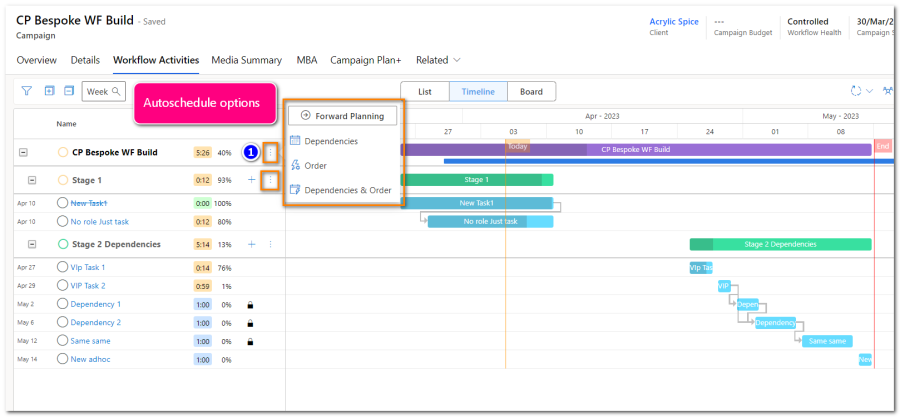
Recommended use cases for using Auto scheduling
- When you have defined a workflow with stages and tasks, and effort, and want to create a cascading relationship from the first task to the last task
- When your workflow stage depends on the campaign live date, consider auto scheduling backwards from that date, then auto schedule all previous stages backwards as well
- When a single stage needs to consider dependencies being completed first before moving on
NEW Cascading Dependencies in Campaign/Project: Workflow Activities
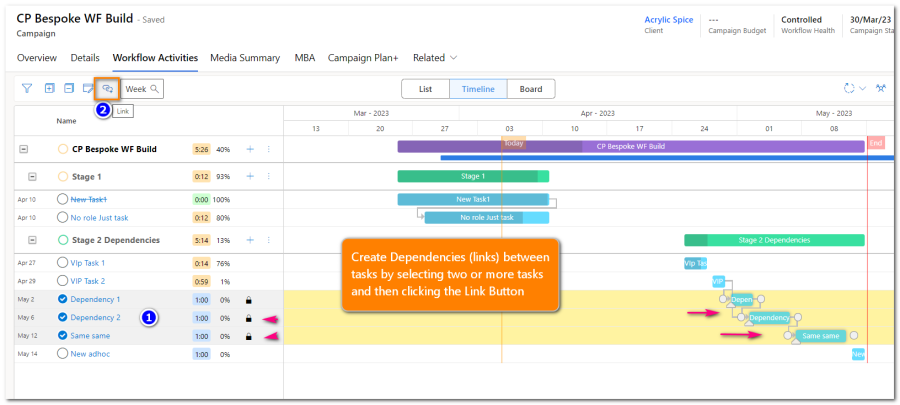
Advvy has made improvements to the campaign/project workflow activities controls to improve the time it takes to create linked dependencies between tasks on the Timeline View.
CURRENT WAY: You can create individual linked dependencies one-by-one manually by using your mouse to click on the top task end marker and drag it to connect to the next tasks start marker.
NOW: You can select multiple tasks (maximum of 25 at a time) and bulk link them to create an end-to-start dependency. These will cascade if you then use auto-scheduling to show the relationship between linked tasks.
NEW Effort and Completion Columns in Campaign/Project: Workflow Activities
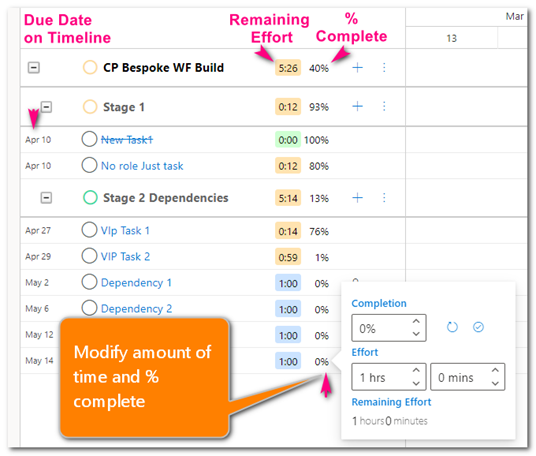
Advvy has added additional detail to Workflow Activities to show the amount of remaining effort in units and % for Tasks. These indicators are found in the List View and Timeline views of Workflow Activities.
Tasks have an ‘Effort’ field that will be preset to 1hour if no value is set at workflow definition/creation.
The total of all task Effort for a workflow will be the sum of all task work to be completed. It will reduce as more tasks are completed, indicating Remaining effort.
- Users can edit the effort/completion values from the workflow activities grid
- Tasks that are ‘Not Started’ will be at 0%
- Tasks that move from ‘Not Started’ to ‘In Progress’ will have a 1% completion value set by default
- Tasks that are set to ‘Completed’ status will show 100%
Alternatively is a user edits the % and not the status
- Tasks that have their % change from 0 to a value less that 100% will have a status of ‘In Progress’
- Tasks that have their % manually changed to 100% will set the task as ‘Completed’.
The remaining effort is displayed as a count of Hours and minutes.
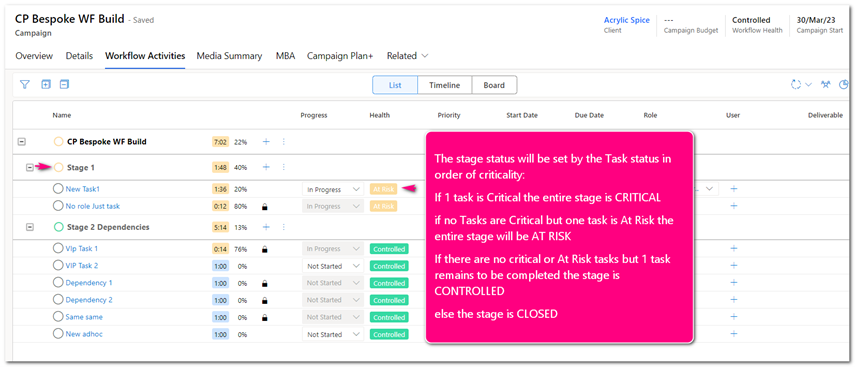
UPDATED Health calculations for Stages
This release has reworked how Stage Health is calculated.
Previous version: Stages had their own health calculation and their own stage due dates and were independent of the tasks within the stage itself. This caused confusion for users and needed to become simpler.
Now: Stage Health is calculated on Activities/Tasks and their health/progress within a workflow.
Release Details
- Enhancements
Area ID Title Bespoke 7386 UM: Expenditure Plan – Add Filter for Branch to available options in App & Portal Campaign 7367 Campaign form: Update Child Campaigns subgrid columns Campaign 7554 Label Change for Campaign Plan tabs where they include Fee Flighting – change to “Campaign Plan+” Core Change 7329 Colour configuration change – allow x flighting types to have configured colours Core Change 7332 Enable add of child/parent relationship between activities for definition. MBA 6834 MBA – ability to download a signed (and date stamped) MBA from the portal Media Planning 7305 Add reference data sync down to the media plan Media Planning 7480 Campaign Flighting record creation needs to be separated into two parts to speed up media plan syncing MBA 7516 Add 2 additional fields for flighting period to support MBAs that are filtered by date range Bespoke Portal 7436 UM: Activity Overview: Date Range Cut Off – in App & Portal Bespoke Portal 7437 UM: Activity Overview: remove bottom level detail – in App & Portal Bespoke Portal 7446 UM: Activity Overview: Update exporting to remove the expand/collapse buttons from the tree Projects 7519 Make Project Workflow optional on initial Create Workflow 7398 Update the Allocate Assign function to be able to handle ADHOC tasks Workflow 7120 New Activity List Control: Multi-Level Grouping Workflow 7164 Workflow/Stage time to be set to default activity time (visually only on WF activities) Workflow 7184 WF Activities – Displaying Effort and Completion Workflow 7441 Improve performance – links Workflow 7452 Advvy Activity Form – Completion % and Effort Workflow 7453 Advvy Workflow Overview – Percentage Complete and Effort Workflow 7454 Activity Logic Plugin – Effort, Completion and Remaining Effort Workflow 7462 WF Activities – Progress slider timeline Workflow 7465 WF Activities – Auto-scheduling Workflow 7468 WF Activities – Tech Debt – Partial Refresh & Component Update Workflow 7477 Remove Stage Due Dates from Workflow status rollup calculations Workflow 7501 Rollup Effort Statistics to Stage and Workflow Levels Workflow 7513 WF Activities – Create links from selection Workflow 7548 Workflow Activities – Create child from parent Workflow 7551 Advvy Activity – Hide time log and display estimated (initial) effort. Workflow 7562 Create a new action to brute force recalculation of the stage statistic
- Bug Fixes
Area ID Title Currency 7491 Expenditure Plan: When currency not filled in on portal contact expenditure plan doesn’t load Portal 7447 Record Campaign Plan [PORTAL]: Data retrieve issue for data containing new lines and quotations Portal 7504 Client Portal: MBA Signature control loads incorrectly on mobile Workflow 7430 Workflow Activity Definition name inconsistent length compared to Advvy Activity subject Workflow 7522 When you open an Activity Definition it updates the sort AND removes the parent task Workflow 7528 Complex Task Child Tasks sometimes created from WF Definition and not added as child tasks Workflow 7534 WF Activities – Links created after completion of an activity block target tasks without reference to the sources tasks completion Workflow 7542 On create of new advvy activity, presetting the progress status does not correctly update effort remaining and completion fields Workflow 7545 Deleting an advvy activity does not recalc stage task start and end dates – affects stage health Workflow 7559 Progress status of advvy activities are being set incorrectly on save of new form
*List excludes internal backend Advvy development and bug fixes.
- Data Upgrades
*Advvy performing data housekeeping on existing records to ensure compatibility with new features
| Title |
| Check all active workflow regarding is not blank |
| Check all active workflows regarding is still active |
| Effort backfill every task has at least an effort and estimated effort of 1 |
| Effort Backfill, closed tasks have 100%, not started have 0%, in progress have 1% |
| Fix 100% completion but not completed |
| Make all campaigns available on the Portal |