For Admins or Users with Extended User access. Agency Settings > Security
In a new Advvy tenancy there’s a “root” business unit from which all business units are connected to. This “root” business unit is created during Advvy’s setup and is where you’ll connect your first Enterprise level business unit.
Business Hierarchy
The Advvy hierarchy controls which parts of the product is accessible to users and connects data throughout the system. The hierarchy structure includes:
- Enterprise level – Business Unit Type
- Agency Level – Business Unit Type with an Enterprise Level Parent
- Branch Level – Business Unit Type with an Agency Level Parent
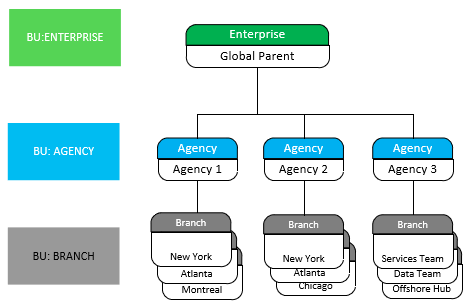
It is important for organisations to design the Advvy Hierarchy to best support the security needs between the Agencies and Branches.
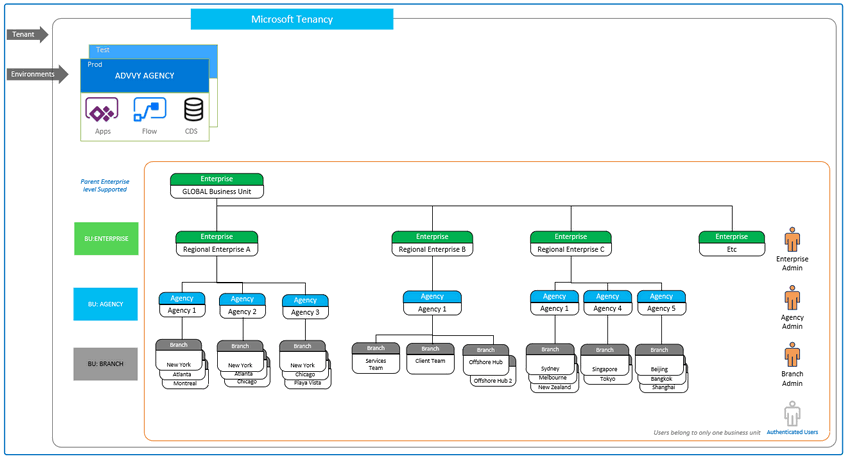
An example of a more complex model can be found at the end of this article.
Business Unit Rules
- There are three levels of Business units available to build any hierarchy structure:
- Enterprise L1,
- Agency L2,
- Branch L3.
- NB: Enterprise Level can also have a Parent Enterprise level to extend the hierarchy model to 4 levels if required for a larger organisation structure.
- There is typically only one Enterprise level business unit per environment.
- User profiles are tied to only one business unit. Most users will be added to a Branch level business unit. Users who require visibility across branches or across agencies can be tied to higher levels Agency or Enterprise.
- Master Data is visible organisation wide regardless of the hierarchy. (Future release will introduce multi-level master data)
Creating an Enterprise Level Business Unit
This level is created at initial setup
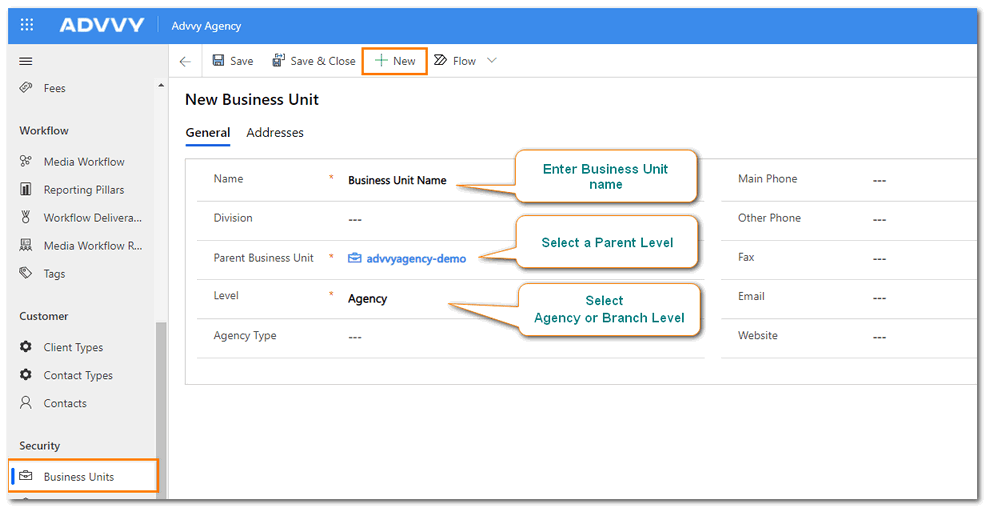
- Navigate to the Business Units section in Advvy Settings.
- Select +New at the top of the screen.
- Add a Name to your business Unit (It’s helpful to use a naming convention that symbolizes it’s enterprise level).
- Select a Parent Business Unit, this should be the “root” business unit mentioned above. If you’re using a new Advvy instance, it should be the only option available.
- In the Level field, select Enterprise.
The Enterprise level business unit is the top-level business unit for the environment. All other business units can be connected to the Enterprise Level business unit.
Creating a New Agency Level Business Unit
Follow these steps to create an Agency Level Business Unit
- Navigate to the Business Units section in Advvy Settings.
- Select +New at the top of the screen.
- Add a name to your Agency Level Business Unit.
- In the Parent Business Unit Field, select the Enterprise Agency that you created above or the existing Enterprise Agency.
- In the Level field, select Agency.
Multiple agencies can be created and linked to the enterprise agency.
Creating a New Branch Level Business Unit
- Navigate to the Business Units section in Advvy Settings.
- Select +New at the top of the screen.
- Name your Branch Level business unit.
- In the Parent Business Unit Field, select the Agency that you created.
- In the Level field, select Branch.
- Save & Close.
Multiple branches can be created and linked to the same agency.
Complex Hierarchy Model Example