Matching the Campaign Dates
In Advvy, when you create a new Campaign record you start by setting the Campaign Start and End dates.
As the media planning process progresses those dates may change, so how do you keep the Campaign Record Dates matching the data in the Media Plan?
1. You can keep manually updating the dates to match the data (yep, just change the dates in the Campaign Record) -or-
2. You can add an automation to the Campaign record, and the dates will change to match the first flight date and the last flight end date – see steps below
Automate Campaign Start & End Dates
- In Advvy, open your Campaign Record and Navigate to the Details tab.
- In the Automations grid set the Process Reference Code to be ADVVY_Sync_FlightingDates
- Save the Campaign record.
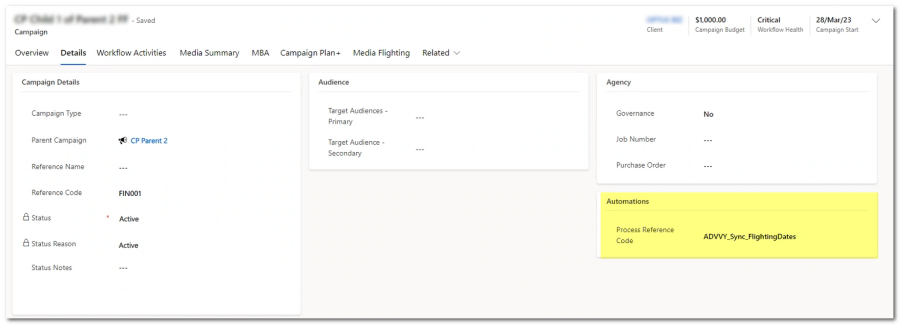
From this point forward, each time you sync a media plan to this campaign, a process automation will trigger in the cloud, and will find the start date and end date from the flighting records and populate the Campaign Plan Start and End Dates automatically.
(It won’t happen instantaneously, it could take up to 1 minute before you see the change…)
This is a flow that needs to be enabled by Advvy – talk to us if it’s not switched on yet.