The Reports section in Advvy provides a list of custom SSRS reports in Advvy. Many of these reports can also be accessed via the Campaigns or Clients section, but there are also additional system reports available.
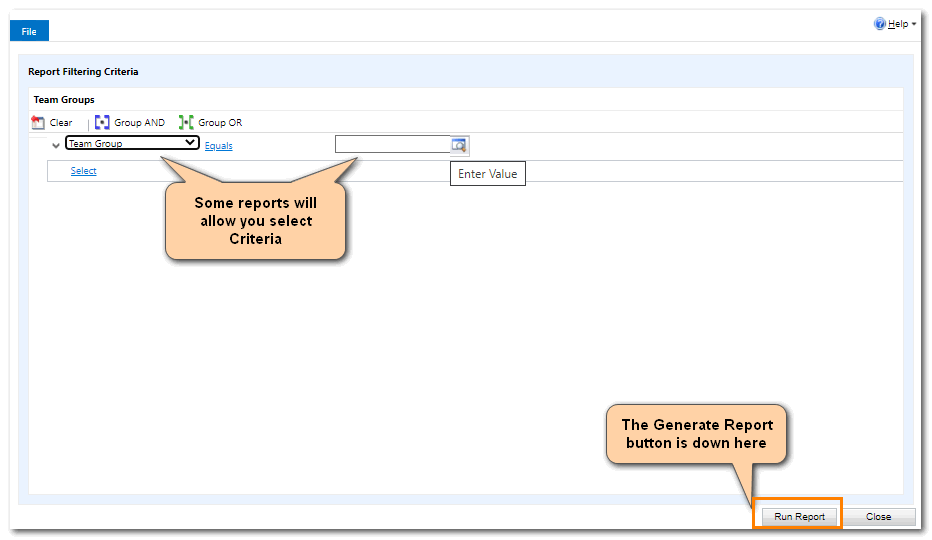
Some of these SSRS reports require you to select criteria – such as a Client name, or a Team Group.
Selecting a report from Tools> Reports will display the [Run Report] button on the bottom left of the screen. (yes we know this is a poor design by Microsoft – lets hope they improve this one day)
Campaign reports available include
- Campaign WIP Summary List
- Campaign Workflow Baseline Detail
- Campaign Workflow Baseline Summary
- Campaign workflow SLA Detail
- Campaign Workflow SLA Summary
- Advvy monthly breakdown by campaign
- Advvy monthly breakdown totals Across campaigns
Navigate to the Campaigns view and select a group of records before running these reports.
Client reports in Advvy include:
- Advvy Campaign Health by Client Detail Report.
- Advvy Campaign Health by Client Summary Report.
- Advvy Fighting type monthly Breakdown Totals by Client
- Advvy Media Spend Detail by Client MT FightingTypeCampaign
- Advvy Media Spend Summary by Client MT FightingTypeCampaign
- Advvy Monthly Breakdown by Client
- Advvy Monthly Breakdown Totals by Client
- Advvy Workflow Effort Summary
Navigate to the Clients view and select a group of records before running these reports.
Other reports in Advvy include:
- Advvy User Team Lists
- Advvy Workflow Effort Summary
- Advvy User Summary
- Advvy Champions Report – select a Team Group to generate this report.